4 minute read · Practical field guide
Define the outbound event with a current-state check
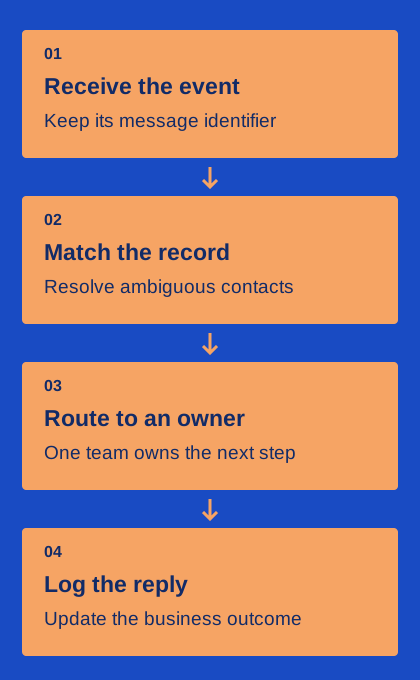
Choose a precise trigger such as “order changed from preparing to ready,” rather than “record updated.” A broad trigger can fire when an unrelated note or address field changes. Before sending, re-read the relevant record and confirm that the condition still holds. If the order has been cancelled or reassigned, the old event should not produce a fresh pickup instruction.
Store a durable reference for the intended business notification and the provider message identifier when available. This lets you distinguish a retried event from a genuinely new update. If the provider request times out, reconcile the uncertain attempt before issuing another independent message. The implementation must follow the provider’s documented behavior; a generic “retry on every error” rule can create duplicate customer communications.
Map incoming replies to more than a phone number
When a reply arrives, preserve the provider’s message identifier and the destination business line as well as the sender. Use existing conversation context to identify the relevant open request. If a shared purchasing number has two active orders, the sender number alone may not be enough. Ask for clarification or assign the ambiguity to a person instead of choosing arbitrarily.
Keep the correction path visible. Staff should be able to see that a message was unmatched, choose the right record and understand whether that correction affects future routing. Audit a few shared-number and duplicate-contact cases before scaling the integration. The goal is accurate context, not automatic matching at any cost. A review queue with clear ownership is preferable to a confident-looking note attached to the wrong customer job.
Turn the reply into a named next step
Define the common answers to your update. “I will collect Friday” may require a scheduling check; “please deliver instead” may require a quote; “wrong order” needs investigation. Route each to a team with authority to resolve it. Record the next action and deadline in the same working system staff already use, with a link back to the customer’s wording.
Avoid marking the order complete merely because an inbound message arrived. The meaning of the reply matters. A staff member or permitted workflow should apply the business change and then confirm the result to the customer. If an external system rejects the update, preserve that failure and keep the request open. A friendly acknowledgement should not claim that a booking or delivery has changed before the authoritative record says so.
Reconcile changes made through other channels
Customers also call, email and speak to staff in person. Decide how those updates affect pending texts. A phone cancellation should stop an obsolete reminder just as an inbound text would. A revised contact number should be reflected before the next message is prepared. This usually requires a clear source for current preferences and business status, plus a final check at send time.
Keep a lightweight exception report: unmatched replies, failed record writes, stale pending messages and conversations without owners. Give each category a recovery action. An administrator should know whether to correct data, retry a safe operation or ask staff to contact the customer. Reconciliation is part of normal operations, not only a response to a major incident.
Prove the mapping with a small acceptance pack
Create test cases for one normal pickup confirmation, two orders sharing a contact, a cancelled order, a changed phone number, a duplicate event and an unavailable owner. For each, specify the expected record, outgoing behavior, task assignment and final status before running the test. Use fictional records or appropriately authorized test data so the exercise does not disturb real orders.
Afterward, inspect the CRM and messaging records together. Confirm that every event is traceable, every unresolved request is visible and no duplicate action occurred. Keep the mapping sheet and results for the person who maintains the connector. Public provider pages can establish advertised integration scope, but only your configured workflow can show whether the correct record and owner receive the right information.